Impostazione del segnale acustico
Per configurare la notifica sonora, scaricate il software Printer Setting, poi nella scheda Hardware spuntate "Beep After Cut" e fate clic su SET. Una notifica sonora conferma che la nuova impostazione è stata accettata.
Modelli compatibili: CLOUD: PP58EWG, PP58EWG-R, PP80EWG, XPDY80EWB, XPDY80EWBG UBER EATS: PP80UEWBT, XPDY80UWB POS: PP80USBEBW, XPDY80U, XPDY80USBEBW, XPDYPOS80UEB
La notifica sonora viene attivata solo dopo un taglio della carta (autocut): sui modelli cloud dovete quindi utilizzare il tag di taglio carta alla fine dello scontrino.
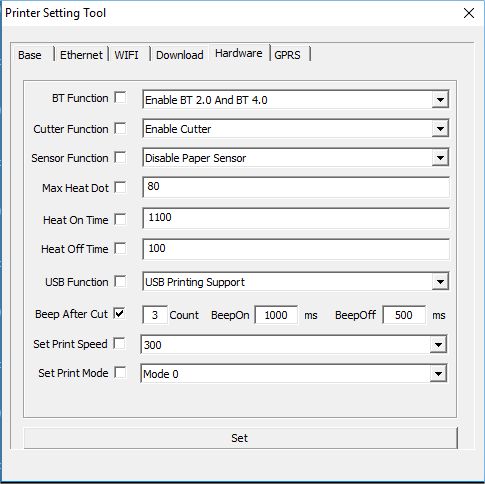
Nota bene: il software consente di modificare, ma non di leggere, i parametri già impostati sulla stampante collegata. I dati visualizzati nel software sono forniti a titolo di esempio.