How to install the PrinterSetting software
Windows only
Compatible models
| Range | Models |
|---|---|
| CLOUD | PP58EWG, PP58EWG-R, PP80EWG, XPDY80EWB, XPDY80EWBG |
| UBER EATS | PP80UEWBT, XPDY80UWB |
| POS | PP80USBEBW, XPDY80U, XPDY80USBEBW, XPDYPOS80UEB |
Installation steps
Download the PrinterSetting software github.com/ExpedyDev/printer-setting-tool/releases
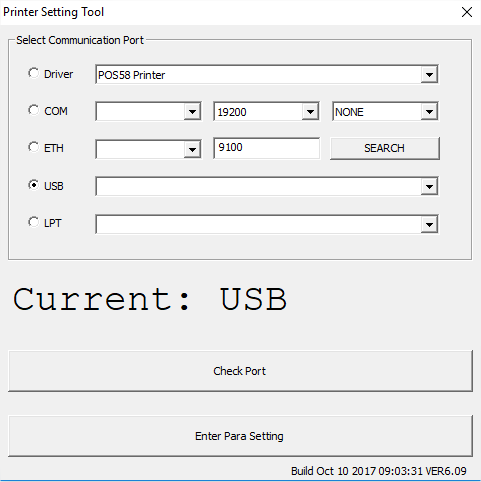
Connect the printer Use a USB cable, or an Ethernet cable plugged into the same network as your computer.
Select the port Choose USB or ETH, then click [Check Port].
Confirm the connection A Check Port Success receipt is printed to confirm that the printer is reachable.
Open the configuration panel Click [Enter Para Setting] to access the settings.
Good to know
- Every modification is confirmed by a printed receipt and/or a beep.
Warning The software lets you edit the printer settings, but the values displayed when you open it are not the ones currently in use. They are the default settings.