Shopify: Bestellungen automatisch drucken (Cloud Print)
Bevor Sie beginnen: Sie brauchen ein Expedy-Konto und einen dort aktiven Drucker. Noch nicht angelegt? Folgen Sie der Anleitung zu Ihrem Gerät, Expedy XPDY80, HSPOS, Star Micronics oder Raspberry Pi.
Wenn ein Kunde in Ihrem Shopify-Shop eine Bestellung aufgibt, wird automatisch ein Beleg auf Ihrem angeschlossenen Drucker gedruckt, kein Knopfdruck, keine manuelle Aktion erforderlich.
So funktioniert es
Mit der Webhook-Funktion von Shopify können Sie Bestelldaten sofort an eine externe URL senden, sobald ein Ereignis eintritt. Indem Sie einen Webhook auf die Expedy API richten, löst jede neue Bestellung einen automatischen Druckauftrag auf Ihrem Drucker aus.
Einrichtung, Webhook in Shopify erstellen
- Melden Sie sich in Ihrem Shopify-Adminbereich an
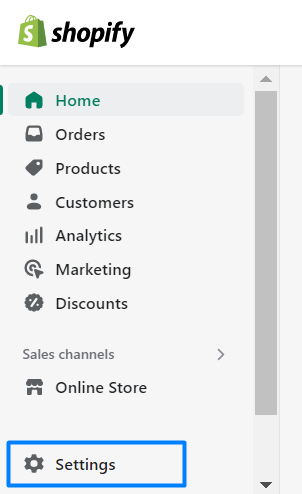
- Gehen Sie zu Einstellungen
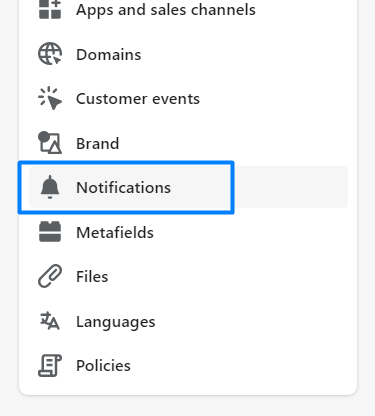
- Klicken Sie auf Benachrichtigungen
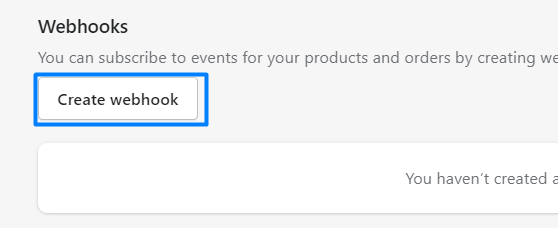
- Scrollen Sie ans Ende der Seite und klicken Sie auf Webhook erstellen
- Füllen Sie die Webhook-Einstellungen aus:
| Feld | Wert |
|---|---|
| Event | Order Creation |
| Format | JSON |
| URL | Ihre Expedy-Webhook-URL (siehe unten) |
| API version | Latest |
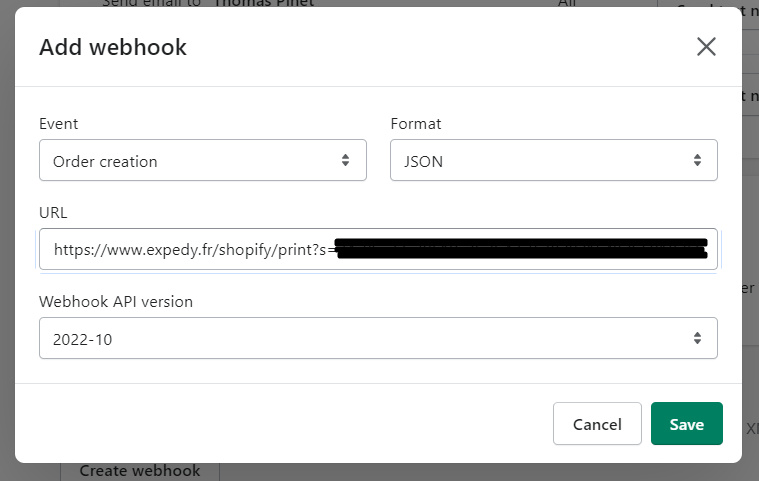
- Klicken Sie auf Speichern
Alle neuen Shopify-Bestellungen werden nun automatisch auf Ihrem angeschlossenen Drucker gedruckt. Sie können beliebig viele Webhooks und Drucker hinzufügen.
Webhook-URL
Ihre Webhook-URL finden Sie direkt in der Expedy-Konsole unter Printers → Select printer → Shopify URL.
Sie hat folgendes Format:
https://www.expedy.fr/shopify/print?s=SID&t=TOKEN&p=PRINTER_UID
| Parameter | Beschreibung |
|---|---|
s |
Ihre API-SID, verfügbar in der Konsole unter API |
t |
Ihr API-TOKEN, verfügbar in der Konsole unter API |
p |
Ihre Drucker-UID, sichtbar in der Konsole unter Printers |
Testen Sie Ihre Einrichtung
Sobald der Webhook konfiguriert ist, geben Sie eine Testbestellung auf, um zu prüfen, ob der Druck korrekt funktioniert.
Eine Anleitung finden Sie in der Shopify-Dokumentation zu Testbestellungen.
Sind Sie Shopify-Experte?
Helfen Sie anderen Händlern bei der Einrichtung von Expedy Print. Treten Sie unserem Partnerprogramm bei und vernetzen Sie sich mit Nutzern, die professionelle Unterstützung benötigen.